Let’s be honest about the state of remote tutoring and online education: it often feels like a technical battle. You log into a video call, ready to explain a beautiful, complex concept—perhaps a tricky calculus equation, an organic chemistry structure, or a detailed sentence diagram. But the moment you share your screen, the human connection drops. You find yourself fighting against clunky drop-down menus, battling lag, or trying to write legibly with a trackpad while your student stares blankly at a frozen screen.
Suddenly, you aren't an educator anymore. You’re an accidental tech support agent trying to navigate bloated enterprise software.
At LearningBoard, we knew there had to be a better way. We believe that remote teaching shouldn’t feel like trying to build a house with a plastic hammer. It should feel as fluid, immediate, and intimate as sitting right next to your student at a physical desk.
Here is an honest, deep dive into exactly how learningboard.online strips away the digital friction to make remote teaching feel natural, effortless, and deeply human again.
1. Zero Latency: Teaching at the Speed of Thought
We have all experienced the dreaded "digital lag." You draw an arrow or write a letter on a standard online whiteboard, and it takes a full second for the stroke to actually appear on the screen. It doesn't sound like much, but that tiny delay completely disrupts the human brain's natural rhythm. It breaks your train of thought, forces you to slow down your handwriting unnaturally, and causes your student to lose focus.
LearningBoard completely obliterates this issue by operating as a 100% client-side application.
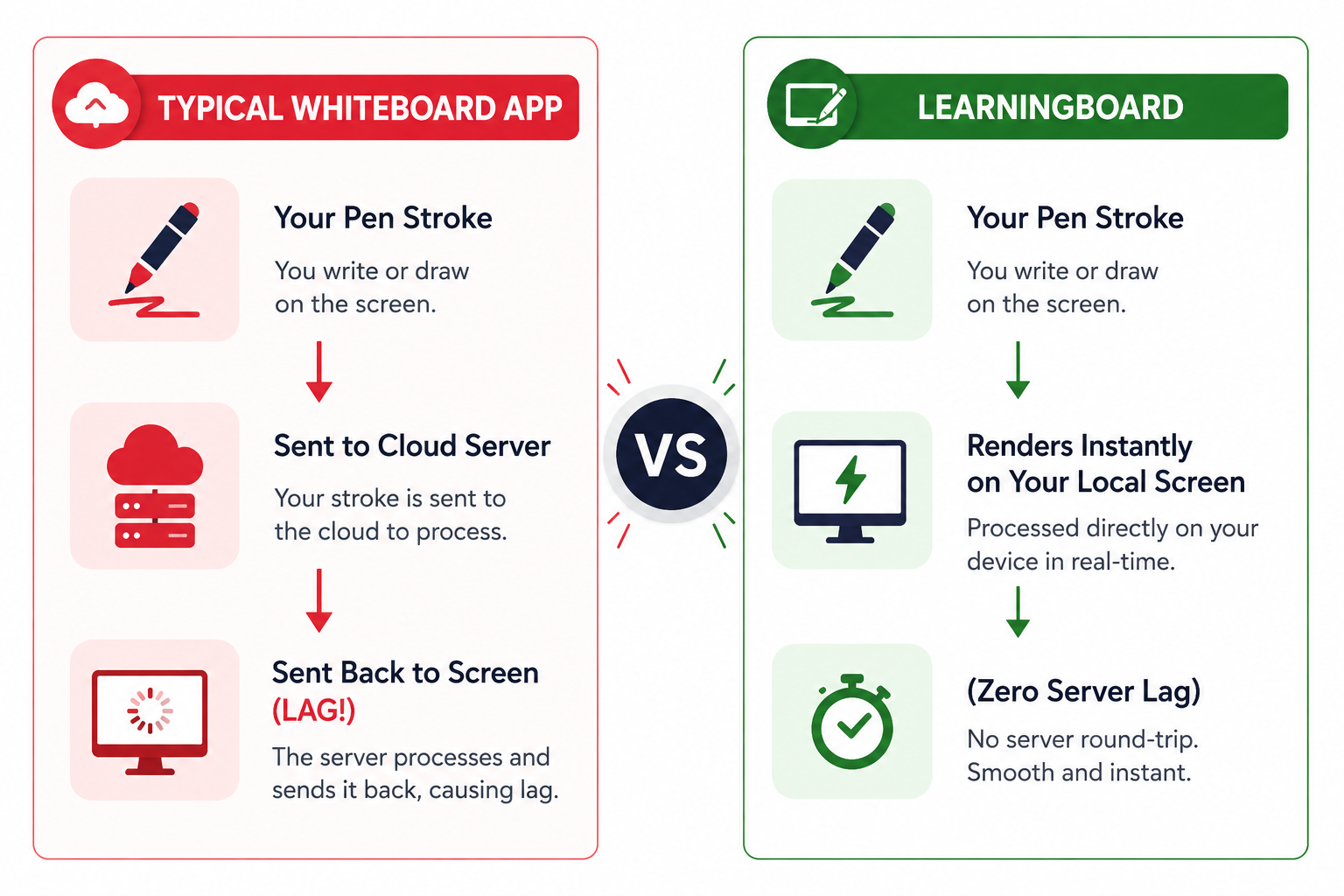
When you write on our virtual chalkboard, your computer or tablet isn’t constantly sending your brush strokes to a distant cloud server to be processed and sent back. Everything renders instantly right inside your own browser window. When you share your browser window over Zoom, Google Meet, or Microsoft Teams, your students see your diagrams unfold in real-time, exactly as your hand moves. There is no lag, no stutter, and no friction.
2. True Hardware Realism That Respects Your Handwriting
Most digital whiteboard tools treat your stylus like a blunt instrument. Whether you press lightly or push down hard, you get the exact same flat, static, pixelated line. It strips away the nuance of your natural handwriting and makes drawing complex symbols—like mathematical integrals, musical notation, or physics vectors—feel impossibly awkward.
We spent months perfecting our engine to support native stylus pressure sensitivity.
If you use an Apple Pencil on an iPad, a Wacom tablet, or a Huion drawing pad, LearningBoard reads the exact physical pressure of your hand. A light graze creates a dusty, faint chalk outline. A firm press yields a bold, solid, opaque stroke.
Furthermore, our custom audio engine produces realistic chalk scratching sounds that dynamically scale with your drawing speed. This subtle sensory combination grounds you, making you forget you are staring at a piece of glass and allowing you to teach with your authentic, natural flair.
3. Absolute Privacy: No Accounts, No Paywalls, No Setup
The biggest barrier to remote teaching is often the sheer amount of administrative clutter required just to start a lesson. You shouldn't have to log into a platform, update your password, bypass a premium subscription pop-up, and accept a tracking cookie policy just to show a student how a fraction works.
LearningBoard is built as an anti-friction application. There are absolutely:
- No email registrations required.
- No hidden subscription plans or locked features.
- No user data tracking or background cookies.
You open your browser, go to learningboard.online, click a button, and your board is ready. Because it runs locally, your data is completely secure. Your lesson plans, sketches, and student notes live entirely in your device's private local memory, never touching an external cloud server. It is a tool designed to completely protect both you and your students.
4. The Distraction-Free Digital Environment
Modern EdTech applications are obsessed with adding buttons. They load their interfaces with clip-art libraries, complex geometric shape generators, chat boxes, and flashing notifications. While this looks impressive in a corporate sales brochure, it is an absolute nightmare for actual learning. Children and adult students alike are easily overwhelmed by visual noise.
LearningBoard intentionality offers an elegant, distraction-free classroom environment.
| System Element | The Distracting Whiteboard Approach | The LearningBoard Solution |
|---|---|---|
| Interface Design | Crowded sidebars, floating widgets, messy popups. | Clean, edge-to-edge minimalist canvas. |
| Aesthetic Theme | Harsh, glaring bright white backgrounds. | Comforting, authentic greenboard & blackboard themes. |
| Visual Focus | Endless menus that break the lesson's flow. | Puts your live, handwritten explanations front and center. |
By switching seamlessly between a retro, nostalgic greenboard and a deep blackboard aesthetic, you create a high-contrast canvas that is incredibly easy on the eyes during long, late-night screen sharing sessions. Your students won't look at the tool; they will look at what you are teaching.
5. Unbreakable Offline Reliability
Imagine this nightmare scenario: You are right in the middle of a paid, high-stakes remote tutoring session before a student's final exam. Suddenly, your home Wi-Fi stutters or drops out for a few minutes. If you are using a standard cloud-reliant digital board, the page crashes, your work is wiped out, and you lose everything.
LearningBoard is uniquely built as a Progressive Web App (PWA). The very first time you load our website, your browser securely caches all the core files needed to run the app directly onto your local hard drive.
If your internet completely drops, the canvas doesn’t freeze. You can keep writing, explaining, and sketching without losing a single line of work. You can even completely close your computer, head down to a local coffee shop without Wi-Fi, open your device, and launch LearningBoard completely offline to map out your next lesson. It is a rock-solid tool that adapts to the messy, unpredictable realities of everyday life.
Reclaiming the Joy of Online Teaching
Remote teaching shouldn’t feel cold, distant, or mechanical. It is a profound, life-changing interaction between an educator who possesses knowledge and a student who wants to grow. The technology we use should serve as a transparent bridge between those two minds, not a roadblock.
LearningBoard takes the clutter out of the equation and leaves you with the single most powerful educational device ever invented: a beautiful, clean slate. It gives you back your handwriting, honors your unique teaching style, and respects your student's time and attention span.
If you are ready to stop fighting your software and start enjoying your online classes again, head over to our main app page and open your board. Experience the difference that a genuinely human-centered tool can make in your remote classroom.