If you have spent any time teaching online over the last few years, you already know the frustration. You open up a video call, share your screen, and get ready to explain a complex math formula, a physics diagram, or a language lesson. But the moment you try to draw or write, everything falls apart. The digital whiteboards built into major corporate software are clunky. They lag, they require five clicks just to change a pen color, and writing with a mouse or stylus feels like trying to paint with a brick.
Worse yet, they feel completely corporate. They look like spreadsheet software disguised as a canvas. The warmth, spontaneity, and tactile joy of standing in front of a real, physical chalkboard—chalk dust on your fingers, the familiar scratch of slate, the immediate visual connection with a student—gets completely lost in translation.
We built LearningBoard because we were tired of watching technology get in the way of great teaching. We didn’t want to build another bloated corporate tool with a million confusing menus. We wanted to bring the authentic, unfiltered soul of the classroom back to the digital space.
Welcome to our very first blog post on learningboard.online. Pull up a chair, grab your favorite stylus, and let’s talk about why the simplest tools are almost always the ones that spark the deepest learning.
The Evolution of the Board: Why the Old Ways Still Work Best
There is a reason the traditional blackboard survived for centuries without a major redesign. It wasn't because educators lacked imagination; it was because a physical board is the ultimate canvas for human thought.
When a teacher stands at a board, they aren't just presenting static data. They are thinking out loud. They write a formula, erase a mistake with the side of their hand, draw an arrow to connect two disparate ideas, and emphasize a critical point with a heavy, deliberate stroke of chalk. It is a live, breathing performance. It forces the human brain to slow down and follow the logical flow of information step by step, rather than swallowing a pre-packaged PowerPoint slide whole.
When education abruptly moved online, the tech world tried to replace this brilliant canvas with "feature-rich" enterprise platforms. Suddenly, teachers had to deal with accounts, subscriptions, data tracking, complicated layers, and constant software updates. The tool became something you had to fight against, rather than something that naturally extended your hand.
We realized something vital: Educators don’t want more features. They want a better feel. They don't need a multi-million dollar software suite just to show a student how to balance a chemical equation. They just want a beautiful, clean, responsive surface that behaves exactly like the board they left behind in the physical classroom.
Redesigning the Digital Canvas from the Ground Up
When we sat down to build LearningBoard, we didn't look at what our corporate competitors were doing. Instead, we went back to the physical classroom and studied what makes a traditional blackboard feel so satisfying. Then, we spent countless hours writing clean code to replicate those exact human sensations directly inside your web browser.
We focused entirely on the subtle, micro-interactions that make a digital tool feel alive:
1. The Dynamic Weight of Your Handwriting If you write with a standard digital pen tool on most websites, the line is uniform, flat, and robotic. It looks entirely unnatural. LearningBoard features native, hardware-level stylus support. If you are using an Apple Pencil on your iPad or a Wacom tablet on your computer, our app reads your physical hand pressure in real time. Press lightly, and you get a faint, delicate chalk line. Press harder, and the line becomes thick, rich, and bold. It honors the unique character of your natural handwriting.
2. Sound Creates Presence This might sound minor, but human beings rely heavily on auditory feedback to understand their environment. When you write on a real blackboard, the sound of the chalk tells your brain how fast you are moving and how much pressure you are applying. We built a custom Web Audio engine into LearningBoard that generates realistic chalk scratching sounds. It dynamically changes pitch and volume based on the speed of your stroke. It is a subtle sensory anchor that completely removes the cold, detached feeling of writing on glass.
3. Zero Latency, Zero Friction When you are explaining a breakthrough concept to a struggling student over Zoom or Google Meet, a half-second delay between your hand moving and the line appearing ruins the magic. We optimized LearningBoard to run 100% on the client side. There is no middleman server processing your strokes. The pen responds instantly, providing a fluid drawing experience that lets you teach at the speed of thought.
The Anti-Corporate Manifest: Why Privacy & Freedom Matter
We have to talk about another major issue plaguing modern education technology: the constant commodification of data and privacy. It feels like every time a teacher wants to use a basic tool online, they have to sign up for an account, agree to a massive 50-page privacy policy, bypass three premium paywalls, and worry about what the company is doing with their data.
We find that exhausting. And frankly, we refuse to participate in it.
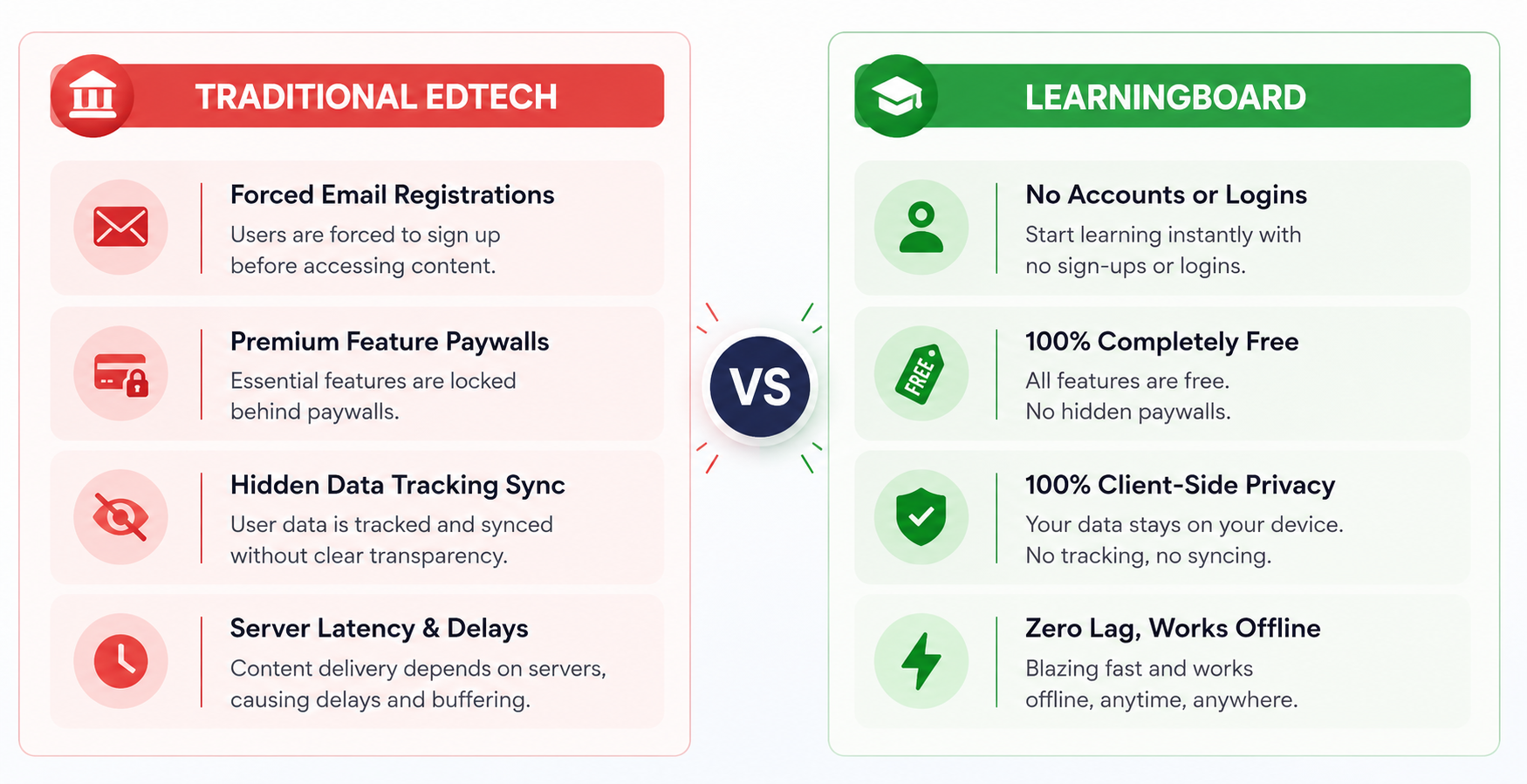
LearningBoard is built on a foundation of radical trust and absolute privacy:
-
No Accounts, Ever: You don't have to give us your email address, create a password, or link your social media profiles. You simply visit the site, click "Open Blackboard," and start teaching instantly.
-
100% Client-Side: Everything you draw, write, sketch, or solve stays entirely inside your browser's local memory. We don't have a database storing your classroom work, because we don't want or need to see it. Your intellectual property remains entirely yours.
-
True Offline Reliability: Because LearningBoard is built as a Progressive Web App (PWA), it loads and caches directly onto your device during your first visit. If your home internet suddenly drops mid-lesson, or if you are working from a remote area with zero Wi-Fi, the board keeps working flawlessly without a single hitch.
What to Expect From This Blog
Now that our digital doors are wide open, what exactly can you expect to find here on the LearningBoard Blog?
We aren't going to spend our time writing dry, search-engine-optimized marketing articles designed to sell software upgrades (mostly because we don't have an upgrade to sell!). Instead, this blog is going to be a dedicated resource hub for independent educators, online tutors, homeschooling parents, university professors, and creative visual presenters.
We are going to deep-dive into the actual art and science of visual communication. Here is a quick look at the topics we are already working on:
- Digital Tutoring Masterclasses: How do you build deep, genuine rapport with a student when you are thousands of miles away separated by a glass screen? We will share practical tips on structuring live digital lessons, setting up minimal audio configurations, and using screen-sharing workflows that maximize engagement without overwhelming your computer.
- The Power of Visual Explanations: We will explore the psychology of why the human brain retains information far better when it is drawn out live versus shown on a bulleted list. We'll breakdown techniques for drawing clear, intuitive scientific diagrams, graphing complex mathematical functions on the fly, and utilizing the spatial layout of an authentic blackboard to help students map out relationships between complex concepts.
- Minimalist EdTech Workflows: The modern classroom is suffering from tool fatigue. Teachers are expected to log into a dozen different platforms every single day. We are massive advocates for minimalism in education technology. We’ll show you how to strip away the digital clutter, pair down your workflow to the absolute essentials, and create an elegant, distraction-free environment that keeps the focus entirely on you and your student.
Teaching is a Human Art Form
At the end of the day, technology is just a tool. A flashy digital platform with thousands of complex settings cannot replace the intuition, empathy, and clarity of a dedicated human teacher who truly cares about a student’s breakthroughs.
LearningBoard was built by people who deeply respect the ancient, noble art of teaching. We wanted to build a workspace that gets entirely out of your way and lets your unique personality, style, and voice shine through your handwriting.
Whether you prefer the nostalgic, comforting greenboard aesthetic or the deep, stark contrast of a classic blackboard, this tool belongs entirely to you. It is 100% free, 100% private, and ready to use whenever inspiration strikes.
Thank you for being part of our community, for exploring our digital board, and for dedicating your time to passing down knowledge to the next generation. We are incredibly honored to support your work.
Welcome to the family. Let’s make something beautiful on the board today.